A common question in live streaming and professional AV workflows is whether NDI can be used together with RTMP and HLS. The short answer is yes, but not directly. NDI, RTMP, and HLS operate at different stages of a video pipeline and are designed for different environments.
Understanding how these technologies fit together avoids confusion and helps design reliable streaming workflows.
What NDI is designed for
NDI is primarily a local network video transport technology. It is optimized for low-latency video movement inside a studio, venue, or production environment. Typical NDI use cases include cameras, software mixers, decoders, and production PCs connected over a LAN.
NDI works best when all devices are on the same network segment with sufficient bandwidth and low packet loss. It is not designed for large-scale public internet distribution.
What RTMP and HLS are designed for
RTMP and HLS serve different purposes from NDI.
RTMP is mainly used as an ingest protocol. It carries a live video feed from an encoder to a streaming server over the internet. HLS, on the other hand, is a delivery protocol. It packages video into segmented files that can be played reliably on browsers, mobile devices, smart TVs, and IPTV applications.
In most modern workflows, RTMP handles the upload of the live stream, while HLS handles viewer playback.
Why NDI and RTMP are not competitors
NDI and RTMP solve different problems. NDI is optimized for production inside a controlled network. RTMP is optimized for sending a single outbound stream to a remote server. HLS is optimized for scalable playback to many viewers.
Because of this, NDI is typically used upstream in the production chain, while RTMP and HLS are used downstream for distribution.
The bridge concept: from NDI to RTMP
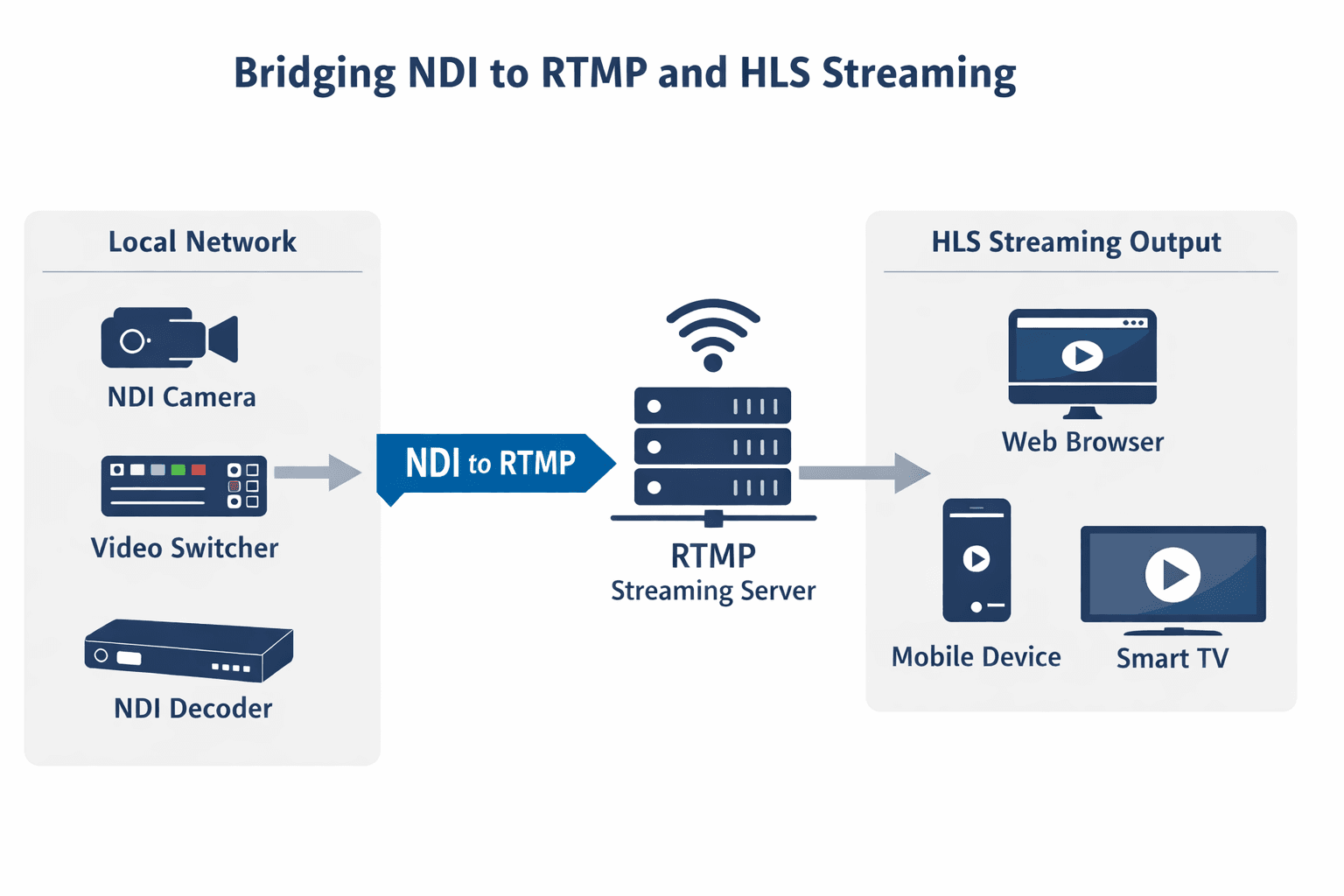
To connect an NDI-based production environment to internet streaming, a bridge is required. This bridge converts an NDI feed into an RTMP stream that can be sent to a streaming server.
In practical terms, the workflow looks like this:
NDI source inside the local network
Conversion from NDI to RTMP at the network edge
RTMP ingest into a streaming engine
HLS output for viewers
This approach keeps NDI traffic local while allowing global distribution through standard streaming protocols.
Common NDI-to-RTMP bridge setups
Several well-established setups are used in real-world deployments.
One common method is using software such as OBS with the NDI plugin. OBS receives the NDI feed, encodes it, and pushes it out as RTMP.
Another option is professional production software such as vMix or Wirecast, which natively support NDI inputs and RTMP outputs.
In hardware-based environments, an NDI-capable camera or decoder feeds video into a traditional encoder that outputs RTMP. This approach is often used in broadcast, corporate AV, and event production.
Handling protected sources in professional AV environments
Some production environments involve protected HDMI sources, such as corporate presentations or licensed media devices. In these cases, HDCP-compliant handling is required to ensure that content protection rules are respected throughout the signal chain.
In professional AV workflows, this compliance is handled at the capture and routing stage. Once the signal is properly processed within compliant hardware, it can then be incorporated into standard production and streaming pipelines without disrupting the rest of the workflow.
Where streaming engines fit into the workflow
Once an RTMP stream leaves the production network, it typically needs a streaming engine to handle transcoding, packaging, and delivery. Platforms such as Wowza are commonly used at this stage to receive RTMP streams and generate HLS (M3U8) outputs for websites, mobile apps, and IPTV-style players.
This separation allows production teams to focus on content creation while the streaming platform manages scale, compatibility, and playback reliability. RTMP-based ingestion combined with HLS delivery remains a standard architecture for live streaming services and reseller platforms.
Is this workflow suitable for TV-style channels
Yes. The same NDI-to-RTMP-to-HLS pipeline is often used for 24/7 channels, scheduled playlists, and IPTV-style services. Live NDI feeds can be combined with pre-recorded content, encoded to RTMP, and delivered as continuous HLS streams to viewers.
This makes the workflow suitable not only for live events but also for always-on channels and internet TV stations.
Frequently asked questions
Can NDI be streamed directly to the internet
No. NDI is designed for local networks. A conversion step is required before internet delivery.
Do I get an HLS or M3U8 playback link
Yes. Once the RTMP stream is processed by a streaming engine, it is typically delivered as an HLS M3U8 URL.
Is latency low with this setup
Latency depends on encoder settings and HLS configuration, but it is suitable for most professional live streaming use cases.
Is this approach widely used
Yes. This architecture is common in broadcast, corporate streaming, education, and live event production.